
IOS Instructions
- Open Safari
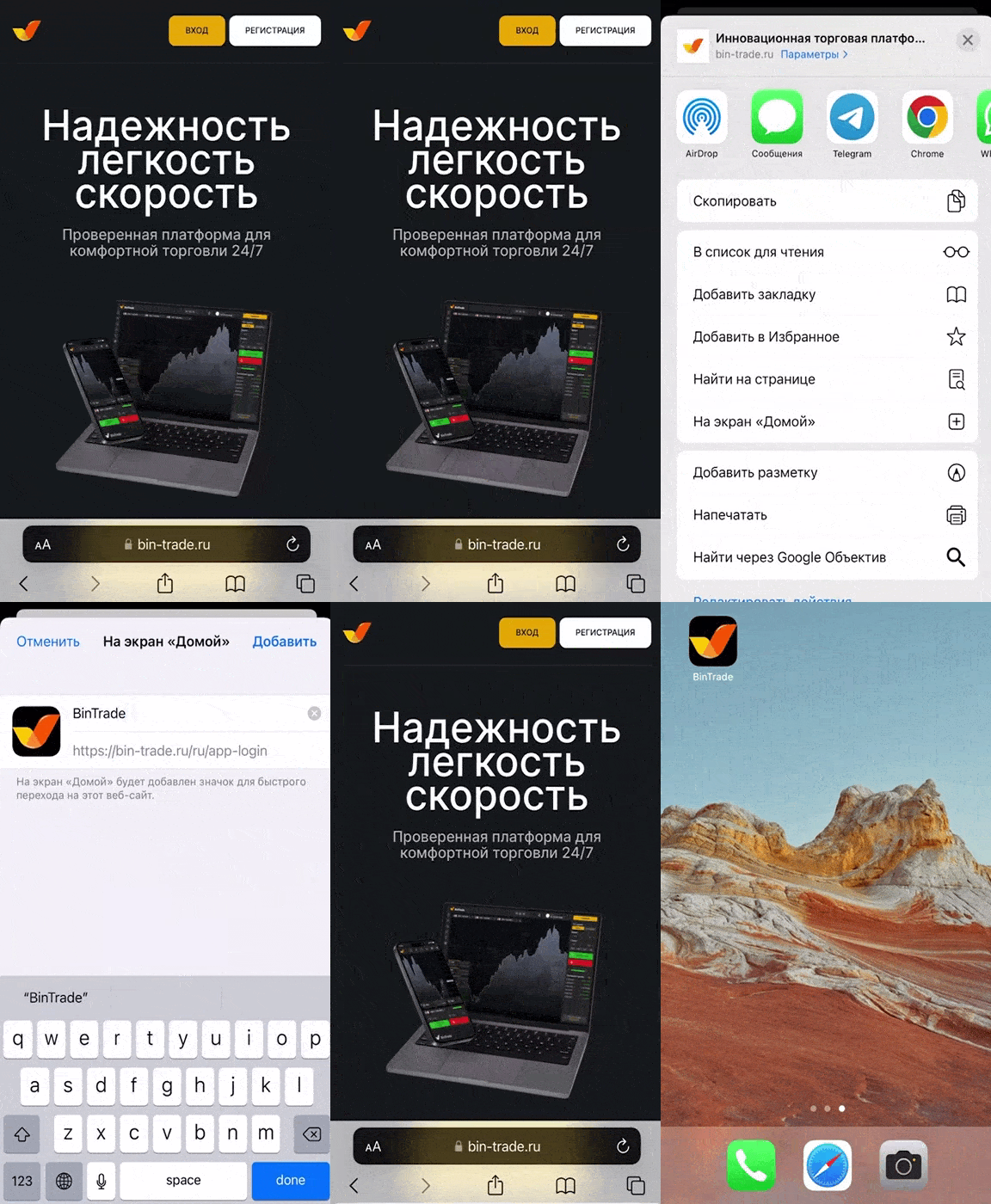
If you are in any other browser, open this page in Safari browser - Click "Share"
Tap the "Share" icon in the menu at the bottom of the screen. A dialog box will open. - Press "To Home Screen"
Tap "To Home Screen" and press "Done"
Bintrade iOS App — Analytical Platform for Financial Markets on iPhone
The Bintrade app is a mobile platform designed for iPhone users who want to access financial markets and analyze market data in a convenient format. It combines advanced analytical tools with a user-friendly interface, allowing seamless interaction with financial instruments. With Bintrade, users can monitor market movements, explore data, and use built-in tools to support informed decision-making directly from their iOS devices.
Key Features of the Bintrade Mobile Platform
The Bintrade platform provides a range of tools for working with financial markets:
User-friendly interface: Optimized for iPhone, ensuring smooth navigation and comfortable one-handed use
Real-time market data: Access up-to-date price information across multiple asset classes, including currencies, indices, and commodities
Advanced charting: Visual tools for analyzing trends, price movements, and key levels
Secure environment: Modern encryption technologies help protect user data and ensure secure access
How to Install the Bintrade App on iPhone (iOS)
- Bintrade is available as a web-based application that works directly in your browser without requiring installation from the App Store
- 1. Open the Safari browser on your iPhone
- 2. Go to the official Bintrade website
- 3. Tap the “Share” icon at the bottom of the screen
- 4. Select “Add to Home Screen”
- 5. Tap “Add” to confirm
The Bintrade icon will appear on your home screen, providing quick and easy access to the platform.
Risk Warning: Bintrade provides tools for financial market analysis and interaction with market data. Users are encouraged to evaluate potential risks and make decisions based on their own research and experience. Trading and operations involving financial instruments carry a high level of risk. Past performance does not guarantee future results. Before using the platform, please review the terms and carefully assess your risk tolerance and financial decisions.